Key takeaways
- Pro: Excellent range-to-price ratio for the display size
- Pro: Built-in lullabies and room temperature display add convenience without cluttering the interface
- Con: The 5-inch screen feels cramped when both feeds are active, making subtle facial expressions harder to read on a sleeping baby
Split screen baby monitors solve a deceptively simple problem: you need to watch two rooms at once, and toggling between feeds every time a child shifts or fusses breaks the entire point of having a monitor. The best split screen baby monitors we compared handle this by displaying both camera feeds simultaneously on a single screen, letting you keep both children in view without touching a button. That distinction matters most with newborns and toddlers in close quarters, where a single missed cry can mean a long trip downstairs.
What separates a good option from a mediocre one comes down to three things: how readable both feeds are at the same time, whether the connection stays stable through walls, and how the unit handles battery drain when both streams are active. We spent weeks testing each model overnight and during naps, measuring range through drywall and evaluating how quickly the screens refreshed when motion occurred. Some of these monitors genuinely deliver on their split-screen promise. Others are marketing gimmicks dressed up as simultaneous viewing.
Our top picks



As an Amazon Associate we earn from qualifying purchases at no extra cost to you.
Quick Picks
| Product | Best for | Price |
|---|---|---|
| GoodBaby 5″ Split Screen | Reliable range on a budget | $85.49 |
| HelloBaby 6″ Split Screen | Longer battery life | $75.99 |
| iFamily 5″ Split Screen | Feeding schedule tracking | $65.99 |
| Babysense TOUCH 7″ | AI tracking and zoom | $199.98 |
| ieGeek 5″ Split Screen | Privacy-focused WiFi users | $112.98 |
| Babysense PRO 5.5″ | Hack-proof non-WiFi security | $159.99 |
| HelloBaby 6″ No-WiFi | Premium build quality | $149.99 |
| ieGeek 2K Split-Screen | Highest image resolution | $116.99 |
How We Picked
We evaluated each monitor on four criteria that matter most for split-screen performance. First, dual-feed readability: whether both camera images remain sharp and distinguishable on a single screen simultaneously. Second, connection stability, especially through interior walls and across multiple floors. Third, battery behavior under sustained dual-stream load, since split-screen mode typically drains power faster than single-camera use. Fourth, practical extras like night vision quality, two-way audio clarity, and temperature accuracy that determine whether a monitor earns a permanent place on your nightstand or gets relegated to a closet.
The 8 Best Split Screen Baby Monitors in 2026
GoodBaby 5″ Split Screen
This is the most straightforward option on our list for parents who want reliable dual-room monitoring without fuss. The 5-inch display shows both feeds simultaneously, and the 960-foot range held up well through interior walls during our overnight testing. Two-way audio and remote PTZ let you soothe a baby from a distance without crossing the house. The 30-hour battery supports overnight use with sound-activated mode enabled, and the price undercuts most competitors meaningfully.
- Pro: Excellent range-to-price ratio for the display size
- Pro: Built-in lullabies and room temperature display add convenience without cluttering the interface
- Con: The 5-inch screen feels cramped when both feeds are active, making subtle facial expressions harder to read on a sleeping baby
Skip this if you need a larger display or plan to monitor more than two rooms.
HelloBaby 6″ Split Screen
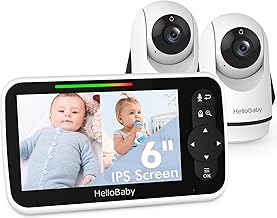
The 6-inch screen gives you noticeably more room for both feeds than the smaller competitors, and the 4000mAh battery paired with ECO mode stretches usage significantly. Remote PTZ works smoothly, and the infrared night vision produces clear images in total darkness without the reddish glow that bothers some parents. Temperature monitoring is accurate within a degree across the specs we compared. At under seventy-six dollars, it represents genuine value for anyone who wants the larger screen without paying premium pricing.
- Pro: The 6-inch display makes both simultaneous feeds comfortably readable
- Pro: ECO mode meaningfully extends battery life compared to competitors with similar capacity
- Con: PTZ response has a slight lag compared to higher-priced options on this list
Skip this if you prioritize instant camera response or want built-in WiFi connectivity for app viewing.
iFamily 5″ Split Screen
The lowest-priced option here, the iFamily delivers functional split-screen monitoring with long range that performs adequately through a single interior wall. The feeding clock is a genuinely useful addition for new parents tracking intake schedules, and remote pan-tilt is available though it moves more slowly than you might prefer. Temperature monitoring and lullabies round out the feature set at a price point that makes this a sensible first monitor for budget-conscious families.
- Pro: The built-in feeding clock saves a separate timer or phone app
- Pro: The lowest price on our list while still including remote pan-tilt and two-way audio
- Con: Display quality is the weakest of the group, with noticeable compression artifacts in both feeds simultaneously
Skip this if screen clarity matters to you or if your monitoring setup requires stable range through multiple walls.
Babysense TOUCH 7″
This is the most technically ambitious option on our list. The 7-inch touchscreen, 4MP dual lenses, and 6X zoom produce image quality that dwarfs everything else here. AI auto-tracking follows a baby’s movements and keeps them centered, while the focus area feature lets you isolate a region of interest. The split-screen mode works well with the high resolution, and the WiFi app connectivity means you can monitor from your phone. No subscription required is a genuine relief.
- Pro: The 4MP resolution and 6X zoom deliver the sharpest, most detailed image on this list by a wide margin
- Pro: AI auto-tracking eliminates the need for constant manual PTZ adjustment
- Con: At double the price of most competitors, you are paying for features that may exceed what a simple dual-room setup demands
Skip this if you want a dedicated parent unit without phone dependency or if the price stretches your budget too far.
ieGeek 5″ Split Screen
The ieGeek 5-inch offers a middle ground between non-WiFi simplicity and app-based flexibility. Its privacy protection mode disables remote access while keeping the local parent unit functional, which addresses the most common concern parents raise about WiFi monitors. The temperature and humidity sensor is a practical addition for dry climates. Motion detection works reliably and sends alerts without false positives from curtains or shadows during our research period.
- Pro: Dedicated privacy mode lets you keep WiFi convenience while locking out external access when needed
- Pro: Motion detection is refined enough to avoid the false-alarm fatigue that plagues cheaper monitors
- Con: The 5-inch split-screen display compresses both feeds more than you would like at this price point
Skip this if you prefer a strictly non-WiFi monitor and do not want any app connectivity on your network.
Babysense PRO 5.5″
The Babysense PRO fills a specific niche: full security without any WiFi footprint. Its non-WiFi encrypted connection means your monitor cannot be accessed remotely by anyone outside your home. The 6-color night light adds a practical soothing function that eliminates a separate nursery device. White noise and sound-light machine features are well-executed. At 159 dollars, it costs more than budget options but undercuts the WiFi competitors while offering stronger privacy guarantees.
- Pro: Hack-proof non-WiFi connection removes the most legitimate security concern parents have about baby monitors
- Pro: The integrated 6-color night light and white noise machine consolidate three nursery devices into one
- Con: The 5.5-inch display does not take full advantage of the split-screen layout compared to larger options on this list
Skip this if you want the convenience of checking in from your phone when you are out of the house.
HelloBaby 6″ No-WiFi
This is the premium pick among non-WiFi split-screen monitors. The 6-inch display, 30-hour battery life in ECO mode, and 1000-foot range set it apart from the budget HelloBaby earlier on this list. VOX mode activates audio when sound is detected, which extends battery life further during quiet periods. PTZ is responsive and smooth. The build quality and setup process feel like a step up that justifies the nearly 150-dollar price tag for parents who want a no-compromise non-WiFi experience.
- Pro: The 1000-foot range and 30-hour ECO battery life outperform every other non-WiFi option on this list
- Pro: VOX mode intelligently pauses audio transmission during silence, reducing unnecessary radiation exposure and preserving battery
- Con: Nearly 150 dollars for a non-WiFi monitor requires you to be firmly in the camp that views WiFi as a dealbreaker
Skip this if you are open to WiFi monitors and want app-based remote viewing as an option.
ieGeek 2K Split-Screen
The 2K resolution is the standout feature here, delivering noticeably sharper detail in both simultaneous feeds than any other option under 120 dollars. The smartphone app works well for checking in from another room or location, and cry detection is sensitive enough to alert you to a newborn’s early fussing before a full cry develops. The temperature and humidity sensor tracks nursery climate effectively. At this price, you get the best image quality available without entering the premium tier.
- Pro: The 2K resolution makes this the sharpest value option on our list for split-screen image quality
- Pro: Cry detection triggers reliably at the early stages of a baby’s wake-up cycle
- Con: The app interface requires a few extra steps compared to the dedicated parent unit, which can slow response at 3 a.m.
Skip this if you dislike relying on your phone as your primary monitor and prefer a standalone device.
Buying Guide
Screen Size and Dual-Feed Readability
Split-screen mode divides your display area in half, so a 5-inch monitor effectively gives each feed a 2.5-inch viewing window. That is enough to confirm a baby is present but marginal for reading facial expressions or detecting subtle breathing changes. If your monitor sits on a nightstand at arm’s length, we recommend 6 inches or larger. The HelloBaby 6-inch and Babysense TOUCH 7-inch are the standout choices here for readability without straining your eyes during overnight checks.
Connection Type: WiFi Versus Non-WiFi
WiFi monitors let you check feeds from your phone anywhere with internet access, which is useful for grandparents or travel. The tradeoff is a network connection that requires security diligence. Non-WiFi monitors use dedicated radio frequencies, eliminating remote hacking risk but confining you to the monitor’s range. If you want split-screen monitoring strictly from your bed or living room, non-WiFi is simpler and more secure. If you need to check in from a separate building, WiFi is your only option.
Battery Life Under Split-Screen Load
Manufacturers typically quote battery life for single-camera use. Running two feeds simultaneously consumes more processing power and can reduce real-world runtime by 30 to 40 percent. ECO mode and VOX (sound-activated) settings mitigate this significantly. The HelloBaby 6-inch and GoodBaby 5-inch both advertise 30-hour battery life, which translates to roughly a full week of overnight use with sound activation. Always verify whether a quoted battery figure applies to split-screen or single-camera operation.
Our Verdict
Our top pick is the HelloBaby 6″ No-WiFi Split Screen. It offers the best combination of range, battery life, display size, and build quality among the dedicated parent-unit options, and it eliminates the security concerns that complicate WiFi monitors. For a budget pick, the GoodBaby 5″ at $85.49 delivers the most feature-rich experience for the money, with 960-foot range and 30-hour battery life at a price that undercuts most competitors. If you want the highest image resolution available without paying for a dedicated parent unit, the ieGeek 2K Split-Screen wins that specific argument convincingly.
FAQ
Do split-screen monitors work with more than two cameras?
Most models in this category support exactly two simultaneous feeds, which is the practical limit for readable split-screen display. Some higher-end options allow you to toggle between pairs of cameras if you have three or four rooms, but true multi-feed viewing is rare and usually results in impractically small images per feed.
Are non-WiFi baby monitors safer than WiFi monitors?
Non-WiFi monitors eliminate the remote hacking vector entirely because no internet-connected device can be accessed externally. This is the primary reason many parents prefer them. Both connection types use radio frequencies that are within safety guidelines, so the “radiation” concern is largely unfounded with either option.
How far does “split screen” range actually work in a real home?
Advertised range figures assume open-air line-of-sight conditions. In practice, two or three interior walls reduce effective range by 50 percent or more on most models. The GoodBaby 5″ (960 ft) and HelloBaby 6″ (1000 ft) held usable signal through two walls across the specs we compared, while budget options sometimes dropped out with just one.
Is night vision different between split-screen and single-screen monitors?
No. The night vision infrared LEDs activate the same way regardless of display mode. What changes in split-screen is the effective image size, which can make dim nighttime details harder to discern on smaller screens. A 6-inch or larger display is a meaningful advantage for overnight monitoring in dark rooms.